Paper timesheets in. Clean data out.
When paper is the source of truth, Mach 1 Sync turns it into clean, approved hours, ready to bill and pay. Capture by photo, scan, or upload, resolve exceptions in one place, and export approved time.
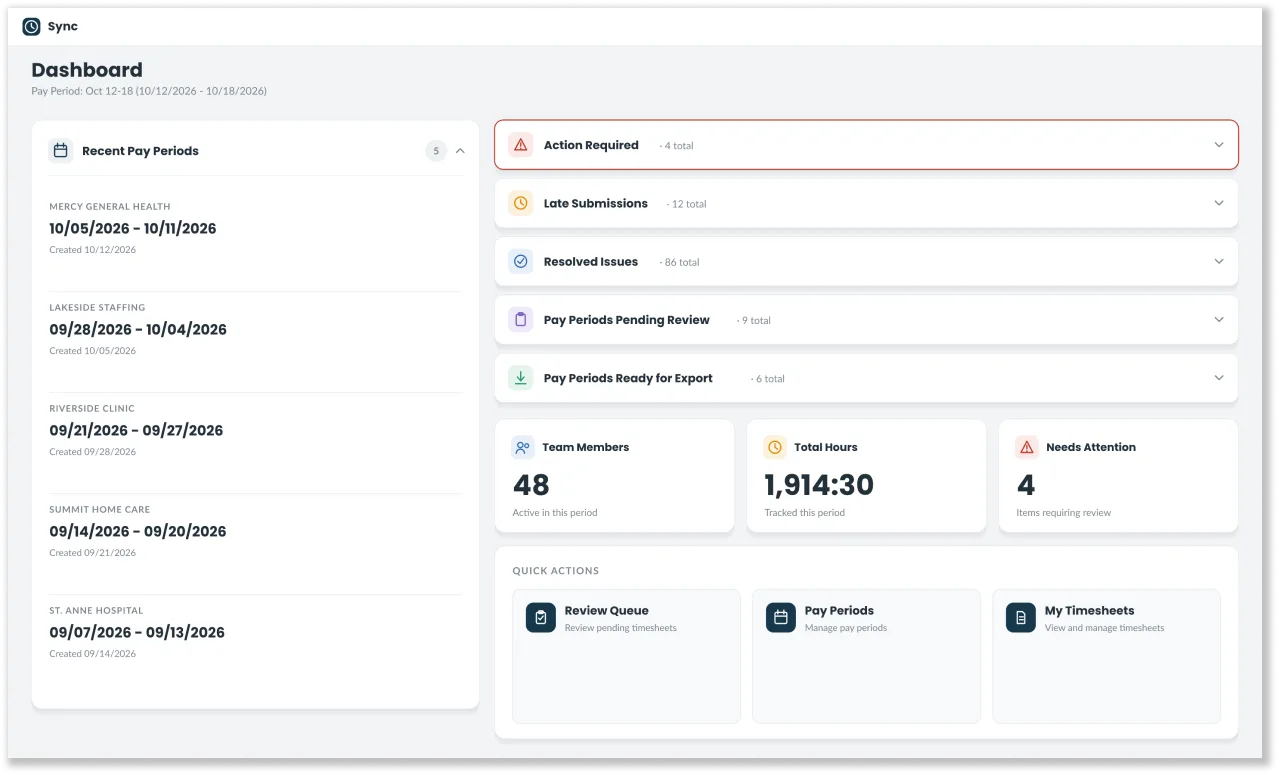
How does Mach 1 process paper timesheets?
Sync (Mach 1 Sync) turns paper timesheets into approved, export-ready hours. Scanned or photographed timesheets are uploaded one at a time or in batches, AI reads the handwriting, and automatic checks flag duplicates, missing signatures, and hours that do not add up. A reviewer corrects and approves each sheet next to its image, then approved hours export as a CSV.
- 01Scheduling & Shift ManagementFill every shift without the coordination chaos.
- 02Workforce & ComplianceLive credential enforcement at every action.
- 03Time, Rates & BillingEvery hour captured. One clean billing artifact.
- 04Analytics & Revenue IntelligenceReal-time margin, fill rate, and leakage.
- 05SyncPaper timesheets in. Clean data out.
Capture
Photo, scan, or drag-and-drop upload, one sheet or a whole batch. However the timesheet arrives, it gets in, and OCR reads hours, dates, totals, and signatures.
Review and resolve
Automatic checks flag totals that do not add up, missing fields, and rule breaks. Comment, correct, and approve on one screen, with a full audit trail.
Export
Approved timecards export for your system of record. From paper to payment, fast.
Paper timecards still run a big share of the field, and they break payroll every week.
Older crews, sites without reliable devices, and clients who require a paper trail all still run on paper. The hours happen, but they arrive by photo, email, fax, and text, and someone keys them in by hand. Manual entry is slow and easy to get wrong. It delays payroll, starts billing disputes, and burns out the ops team. Paper does not have to mean chaos.
Everything it takes to trust a paper hour.
Mach 1 Sync is a capture-and-export pipeline built specifically for timesheets, not a generic scanner.
Book a Demo- 01Flexible capture
single upload, batch upload, and scan or photo ingest
- 02OCR built for timesheets reads hours, dates, totals, and signatures
- 03Smart validation
totals checks, missing-field flags, and business-rule guardrails
- 04Exception queue
comment, correct, and approve with a full audit trail
- 05Export of approved hours for your system of record
Built for the places paper still rules.
Older crews, no-device sites, and client-required paper trails all get clean digital hours without changing how they work.
- Older crews get clean digital hours without changing how they work
- No-device sites stay fully covered without consistent phones or connectivity
- Client-required paper trails are kept, and you still bill on time
From paper to payment, in one pipeline.
- Capture
Photo, scan, or upload
However the timesheet arrives, it gets in. OCR reads hours, dates, totals, and signatures.
- Review & resolve
Automatic checks flag problems
Totals that do not add up, missing fields, and rule breaks. Comment, correct, and approve on one screen, with a full audit trail.
- Export
Export approved hours for your system of record
From paper to payment, fast.
Every capability connects to the next.
Sync: common questions.
Do our crews or clients have to stop using paper?
No. Older crews, sites without reliable devices, and clients who require a paper trail keep working the way they do today. The paper stays. The hand keying goes away.
What happens when a timesheet has an error?
Automatic checks flag the sheet: a pay period mismatch, a duplicate, a missing employee or manager signature, missing breaks, hours that do not match, or an unknown employee, site, or job. A reviewer fixes it side by side with the original image, or declines it with a reason, and every action lands in the audit trail.
Where do approved hours go?
Approved timesheets export as a CSV file, ready to import into your payroll or billing system. Each sheet moves through draft, review, ready, approved, and exported, so you always know what has and has not been sent.